
How to Fix Photocopier Paper Jams Instantly | Copier2U
Frustrated with constant printer jams in your office? Read our guide to how local humidity affects your paper & how to fix photocopier paper jams instantly | Copier2U.
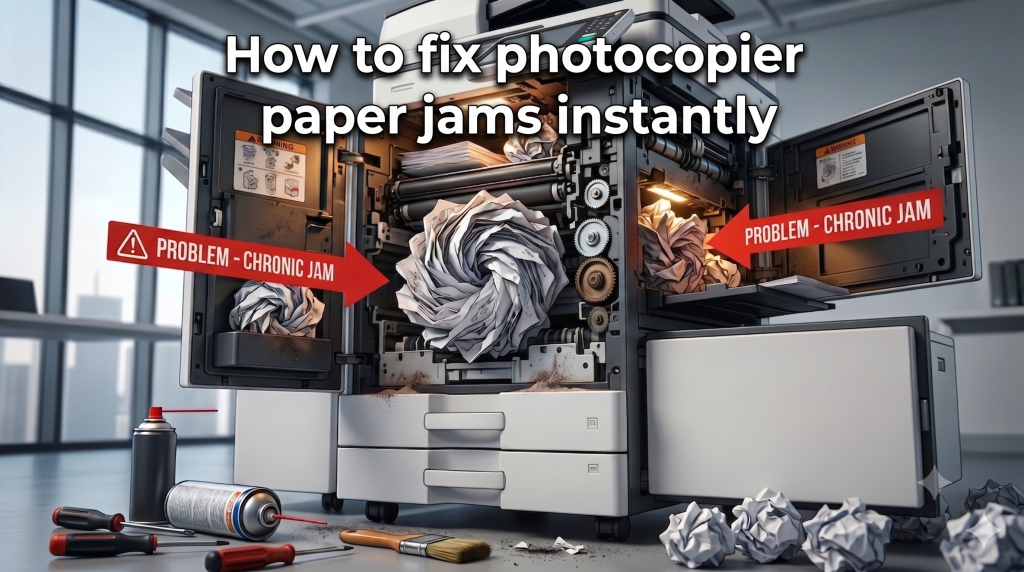
There is nothing more disruptive to a busy office workflow than walking up to the printer with a stack of urgent documents, only to be met with a flashing red error screen and a paper jam alert. While modern office equipment is highly advanced, paper jams remain a frequent headache for administrative teams across the Klang Valley.
Before you call a costly independent repair technician, use this quick troubleshooting guide from the premier copier rental service in KL, Selangor and Putrajaya to check out how to fix photocopier paper jams instantly | Copier2U.
1. The Humidity Trap (Static & Sticking Sheets)
The Cause: Malaysia’s high relative humidity is a major hidden cause behind office printing errors. When paper stocks absorb moisture from the air, the sheets stick together. The copier’s pick-up rollers then grab multiple sheets at once, causing an instant internal jam.
How to fix photocopier paper jams instantly | Copier2U: Always store your bulk paper boxes in a cool, dry cabinet—never directly on the floor or under a leaking air conditioning unit. Fan the edges of the paper stack before placing it into the cassette tray to break any static or moisture bonds.
2. Worn-Out Pick-Up Rollers
The Cause: The small rubber rollers responsible for pulling paper from the tray into the printing engine wear down over time, losing their grip or gathering paper dust.
How to fix photocopier paper jams instantly | Copier2U: Pull out the paper tray and locate the rubber rollers. Gently wipe them with a lint-free microfiber cloth lightly dampened with water to remove accumulated paper dust. If the rubber appears smooth or cracked, it requires professional replacement.
3. Misaligned Paper Trays
The Cause: If the plastic paper guides inside the cassette tray are adjusted too tightly or left too loose, the paper feeds into the engine at a slight angle, resulting in a structural misalignment jam.
How to fix photocopier paper jams instantly | Copier2U: Ensure the plastic sliders are clicked firmly against the edges of your A4 or A3 paper stack without bending the sheets.
Common Paper Jam Types & Quick Resolutions on how to fix photocopier paper jams instantly | Copier2U
| Jam Location | Primary Cause | Immediate Troubleshooting Step |
| Tray / Feed Zone | Damp paper or dirty feed rollers | Fan the paper sheets; wipe rubber rollers with a damp cloth. |
| Internal / Transport | Scraps left from previous jams | Open side panels and check the paper path for tiny torn paper fragments. |
| Fuser / Exit Zone | High temperature paper curling | Open the exit door carefully (Warning: Fuser units are extremely hot) and pull sheets out in the direction of the paper path. |
FAQ
Why does my office copier keep jamming in the exact same spot every day?
If a copier jams repeatedly in the exact same internal zone, it usually indicates a dirty or faulty sensor, a worn-out internal gear, or a tiny fragment of torn paper hidden deep inside the transport path. If a thorough visual check doesn’t solve it, you will need a certified service engineer to clean the internal laser paths and sensors.
Is it safe to pull jammed paper out forcefully from the front of the machine?
No, never pull jammed paper forcefully against the natural direction of the print path. Doing so can easily snap fragile internal plastic gears, tear the fuser belt, or scratch the imaging drum. Always open the designated side panels and roll the manual knobs to slide the paper out gently in its natural direction of travel.
Why does our office copier jam more frequently in the morning when we turn on the air conditioning?
This is a classic issue caused by tropical Malaysian climate dynamics. When your office is locked up overnight without air conditioning, the ambient humidity rises, and the paper sheets inside the tray absorb moisture like a sponge. When the morning staff turns on the A/C, the rapid temperature drop causes damp sheets to cling together with static electricity. The pickup rollers then accidentally grab two or three sheets simultaneously, causing an immediate feed jam.
If you secure a package under our photocopier rental framework, we combat this issue by deploying models from the top 3 best photocopier in Malaysia that feature internal de-humidifying tray heaters. These smart modules actively dry your paper stock automatically to eliminate humidity-related misfeeds.
What should I do if the screen displays a paper jam error, but there is no paper found inside the machine?
This frustrating phenomenon is known in the industry as a “ghost jam.” It usually happens when a tiny, invisible scrap of torn paper from a previous jam is left behind, blocking an internal electronic photo-sensor. Alternatively, heavy paper dust can accumulate and coat the sensor lens, blinding it into thinking the print path is obstructed.
If your company utilizes our Copier rental service in KL – Copier2U, your admin team doesn’t have to waste time unscrewing internal panels to locate these delicate sensors. You can simply submit an immediate technical request, and a localized service engineer will arrive at your premises to thoroughly clear, vacuum, and calibrate your internal sensors at zero extra charge.
Can printing thick cardstock, envelopes, or custom labels cause continuous paper jams?
Yes, completely. Standard paper cassettes are strictly engineered to feed standard 70gsm to 80gsm copy paper. Attempting to run thick certificates, glossy brochures, or adhesive labels through the main drawers forces the internal rollers to bend materials beyond their structural limits, causing instant internal blockages. Thick or specialized media should always be fed through the Bypass Tray (Side Tray).
When you choose a corporate contract under our Copier2U-reliable photocopier rental in Selangor program, our technical team provides hands-on operational training to your staff. We demonstrate how to configure the bypass settings on our premium hardware—drawn from the top 3 best photocopier in Malaysia—to handle heavy media stocks up to 300gsm smoothly without triggering mechanical jams.
Is it safe to use a pair of tweezers or scissors to pull out a torn piece of paper stuck deep inside the fuser unit?
No, never insert sharp metal objects like scissors, screwdrivers, or tweezers inside the machine’s internal paths. The fuser unit operates at extreme temperatures exceeding 180°C to melt toner powder onto the paper fibers. Shoving metal tools into this zone can easily slice the delicate fuser belt, puncture the pressure rollers, or permanently scratch the imaging drum—resulting in a repair bill that can cost thousands of Ringgit.
If a stubborn sheet tears and becomes unreachable within your corporate office, our specialized Copier2U-copier rental in Putrajaya service has you fully covered. Simply leave the machine open, give our hotline a call, and let our certified technical squad handle the removal safely using specialized, non-abrasive tools.
Does using cheap, unbranded copy paper increase the frequency of paper jams?
Yes, using ultra-cheap or poorly manufactured paper brands drastically increases your jam rate. Low-quality paper stocks are often unevenly cut, generate high amounts of static charge, and shed a massive volume of loose paper dust. Over time, this dust coats your internal rubber rollers, causing them to lose their traction and slip when trying to pull paper into the printing engine.
While the heavy-duty fleet supplied by our Copier rental service in KL – Copier2U features advanced multi-roller separation technology to minimize these issues, we always recommend pairing your enterprise-grade machine with high-quality 80gsm paper brands to ensure smooth everyday performance.
Copier2U's Services
Find the right product based on your requirement.
Refurbished Copiers
Our refurbished copier offer a smart printing solution for businesses seeking reliable performance without compromising on affordability.
Digital Black / White & Colour Copiers
As specialists in refurbishing all kinds of B/W and color copiers from top brands, we offer affordable rental copier plans to meet your business needs.
Spare Part and Consumables Item
Whether you’re in need of replacement parts or consumables to keep your copier running smoothly, we’ve got you covered.
Maintenance Contract
With our maintenance contracts, you can enjoy peace of mind knowing that your copiers are well taken care of.
Copier Rental Service
We offer highly flexible photocopier rental plans tailored to match your specific business timeline and budget. Whether you need a Short-Term Rental, or a Long-Term Rental, we have you covered.
Find us
What Our Clients Say
Trusted by businesses across Kuala Lumpur, Selangor & Putrajaya for reliable photocopier rental and fast support.

4.9 Google Rating • Verified reviews from real customers across Malaysia
Our dedicated technical dispatch team provides rapid 24-hours on-site maintenance to ensure your office print workflow runs smoothly. We proudly serve corporate offices, small businesses, and events across all major commercial hubs within Kuala Lumpur, Selangor, and Putrajaya. Secure your copier rental with Copier2U.
Choosing the right office hardware configuration can significantly impact your monthly overhead. Before committing to a machine, it is highly recommended to read our comprehensive guide on Copier2U-How to Fix Black Lines & Streaks on Copier Prints to discover the proper solutions to fix copier issue. Additionally, keeping your operational budget safe is easy once you understand the simple maintenance habits outlined in our guide on Copier2U-The Importance of Preventive Maintenance.
Request free quote now
Fill in form or call us +6019 263 0988.
Connect with us today and discover how our expertise can empower your projects.