
Canon vs Konica Minolta Copier Rental: Which Is Better for Your Office?
Navigating the technical differences between two imaging giants? Read our objective Canon vs Konica Minolta copier rental breakdown to choose the perfect office engine via Copier2U.
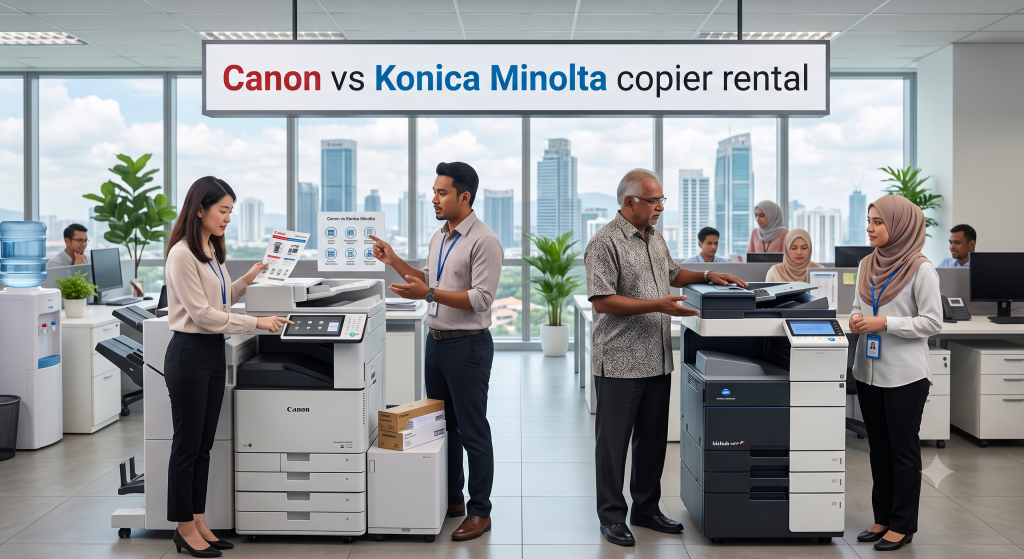
Equipping a modern corporate environment with the right document infrastructure requires looking past simple monthly leasing metrics to analyze internal processing speeds, network endpoint security protocols, and visual rendering styles. When office administrators and IT directors compare top global print brands, they face an essential choice: reviewing a Canon vs Konica Minolta copier rental: which is better for your office? framework. Both print ecosystems have earned global acclaim for good reason, yet they fit completely different workflow priorities, file-sharing structures, and graphic presentation demands.
[Canon Ecosystem Focus] ───────► Secure Cloud Integration • uniFLOW Serverless Management • User-Centric Touch Panels
[Konica Minolta Focus] ───────► Elite Graphic Contrast • Simitri HD Polymerized Toner • Heavy Mechanical Stamina
Evaluating a Canon vs Konica Minolta copier rental: which is better for your office? plan through the multi-brand leasing services at Copier2U gives your company an objective, data-driven perspective. Since 2000, we have supplied local workspaces with top-tier configurations from both brands. We help you choose the ideal system for your administrative workspace, converting equipment management from an unpredictable task into a smooth, tax-efficient utility covered by full breakdown protection.
The Canon Philosophy: Unifying Cloud Agility with Zero-Trust Security
For offices that run hybrid work environments and require seamless digital archiving, the Canon imageRUNNER ADVANCE DX range delivers exceptional performance. Canon builds its corporate ecosystem around user-centric touchscreen design and serverless cloud networking pathways via uniFLOW Online.
Canon systems excel at transforming physical documents into encrypted cloud-native files. Staff can walk to the machine, authenticate their user profile with a secure PIN code, scan a large stack of vendor documents through the high-speed Single-Pass DADF, and convert pages into Searchable PDFs that route straight to Google Drive or Microsoft OneDrive. Backed by McAfee Embedded Control firmware protection, Canon platforms act as highly secure network endpoints, blocking unauthorized software execution and safeguarding your digital workflows.
The Konica Minolta Philosophy: Unmatched Mechanical Stamina and Graphic Precision
For workspaces that process complex architectural layouts, colorful marketing drafts, dense spreadsheet data, or heavy multi-shift print runs, the Konica Minolta bizhub line delivers incredible performance. Konica Minolta builds its reputation on heavy-duty internal steel gears and its world-renowned Simitri HD Polymerized Toner system.
Simitri HD toner utilizes micro-spherical, eco-efficient particles with low melting thresholds, fusing cleanly into heavy paper stock up to 300 gsm without gear stress. This ensures that fine monochrome text lines emerge perfectly crisp, charts remain vivid, and colors stay completely consistent across thousands of continuous runs. If your teams require a rugged workhorse with high physical durability and a highly customizable, app-ready operation panel, Konica Minolta represents an exceptional choice.
Canon vs. Konica Minolta Technical Feature Showdown
This comparison matrix highlights the primary functional differences to consider when choosing your technology profile:
| Core Operational Feature | Canon imageRUNNER ADVANCE DX Line | Konica Minolta bizhub Line |
| Primary Workflow Advantage | Serverless cloud ingestion shortcuts; user-centric software. | Elite graphic color replication; robust mechanical stamina. |
| Cloud Software Integration | Built-in uniFLOW Online cloud tracking tools. | Advanced Info-Palette system customizable app shortcuts. |
| Consumable Composition | High-yield dry polymer laser fusion. | Simitri HD low-temperature polymerized toner cores. |
| Built-In System Security | Fortified with McAfee Embedded Control & TPM 2.0. | Secure user authentication logs and Account Track codes. |
| Thick Media Capabilities | Processes label sheets and thick cards up to 300 gsm easily. | Exceptional gear stability on thick, heavy texture stocks. |
FAQ
1. Which brand generally offers more affordable per-page click charges under a corporate lease?
Both brands deliver highly optimized per-page cost models under our managed programs. Generally, Canon is highly economical for structured monochrome data paths and massive multi-user offices, while Konica Minolta offers exceptional price-to-yield efficiency for high-density color documentation.
2. Is Canon's interactive touchscreen interface easier for non-technical office staff to navigate than Konica Minolta's?
Canon’s imageRUNNER ADVANCE DX line features a user-centric, highly smartphone-intuitive 10.1-inch glass interface focused on simple app icons. Konica Minolta’s bizhub Info-Palette screen provides deeper, widget-style layout customization favored by technical IT departments and creative agencies.
3. Which brand handles high-definition graphic design, lookbooks, and color matching more accurately?
Konica Minolta holds a slight advantage for creative firms, architectural studios, and property agencies due to its advanced Simitri HD Polymerized Toner. This specialized spherical toner delivers incredible color contrast, crisp line weights, and consistent image density.
4. How does Canon’s uniFLOW network security software compare to Konica Minolta’s Account Track feature?
Canon’s uniFLOW Online is a cloud-native, serverless platform built for zero-trust security, enabling seamless cross-floor mobile pull-printing and secure card-badge releases. Konica Minolta’s Account Track provides local, device-based user pin logging that is exceptional for on-site client cost-recovery auditing.
5. Do Canon or Konica Minolta copy systems experience fewer mechanical paper jams under continuous heavy workloads?
Both brands feature excellent, rigid metal frameworks built for high duty cycles. Canon systems excel at processing high-speed, light-weight office bonds smoothly through their multi-roller assemblies, while Konica Minolta frames maintain immense stability when feeding thick cardstocks up to 300 gsm.
6. Can both Canon and Konica Minolta multi-functional devices print wirelessly from Apple MacBooks and mobile devices?
Yes, effortlessly. Every modern platform we deploy from both manufacturers features integrated wireless LAN cards that support Apple AirPrint, Android Mopria print services, and secure Wi-Fi Direct protocols for smooth, driverless mobile printing.
7. Does Copier2U supply original, genuine factory-certified toner for both Canon and Konica Minolta machines?
Yes, 100%. We deal exclusively in genuine, high-yield manufacturer-certified consumables across all our fleet programs. Utilizing 100% genuine toner powder preserves perfect laser melting accuracy and stops cheap third-party clogged nozzles from disrupting your office uptime.
8. Which brand is more eco-friendly and energy-efficient for a green corporate procurement office?
Both brands score exceptionally well on global sustainability frameworks. Konica Minolta utilizes biomass-infused toner components that lower carbon production footprints, while Canon features ultra-low power consumption standby sleep states that meet modern GreenRE criteria.
Copier2U's Services
Find the right product based on your requirement.
Refurbished Copiers
Our refurbished copier offer a smart printing solution for businesses seeking reliable performance without compromising on affordability.
Digital Black / White & Colour Copiers
As specialists in refurbishing all kinds of B/W and color copiers from top brands, we offer affordable rental copier plans to meet your business needs.
Spare Part and Consumables Item
Whether you’re in need of replacement parts or consumables to keep your copier running smoothly, we’ve got you covered.
Maintenance Contract
With our maintenance contracts, you can enjoy peace of mind knowing that your copiers are well taken care of.
Copier Rental Service
We offer highly flexible photocopier rental plans tailored to match your specific business timeline and budget. Whether you need a Short-Term Rental, or a Long-Term Rental, we have you covered.
Find us
What Our Clients Say
Trusted by businesses across Kuala Lumpur, Selangor & Putrajaya for reliable photocopier rental and fast support.

4.9 Google Rating • Verified reviews from real customers across Malaysia
Our dedicated technical dispatch team provides rapid 24-hours on-site maintenance to ensure your office print workflow runs smoothly. We proudly serve corporate offices, small businesses, and events across all major commercial hubs within Kuala Lumpur, Selangor, and Putrajaya.
Choosing the right office hardware configuration can significantly impact your monthly overhead. Before committing to a machine, it is highly recommended to read our comprehensive guide on Short-Term Copier Rental for Events, Training & Exhibitions to discover which option best suits your actual monthly print volume. Additionally, keeping your operational budget safe is easy once you understand the simple maintenance habits outlined in our guide on Photocopier Rental Checklist Before Signing a Contract.
Request free quote now
Fill in form or call us +6019 263 0988.
Connect with us today and discover how our expertise can empower your projects.