
What is the best copier for office use? | B2B Procurement Guide
Trying to identify what is the best copier for office use for your workspace? Read our detailed review comparing print speeds, scanning paths, and network data security options at Copier2U.
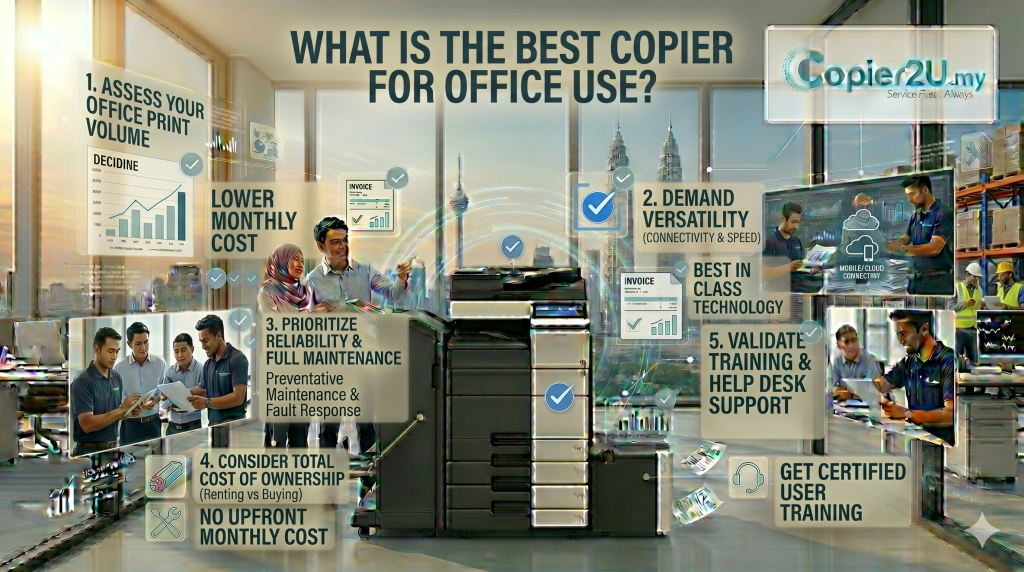
Procuring high-quality document imaging infrastructure for a fast-paced office involves more than just finding a machine that fits your budget line. For corporate high-rises in the heart of KLCC, technology firms in Cyberjaya, and public sector offices in Putrajaya, your central printing engine functions as the primary hub for data scanning, electronic archiving, and physical file distribution. Deploying an underpowered or unreliable system will quickly lead to employee frustration, frequent paper jams, and operational delays. Finding the true answer to What is the best copier for office use for your specific business goals is essential for maintaining efficient everyday workplace productivity.
At Copier2U, we have spent more than two decades analyzing document patterns across thousands of local businesses. To guarantee consistent print quality and technical stability, our expansive lease fleet is composed exclusively of options selected from the top 3 best photocopier in Malaysia: Ricoh, Canon, and Konica Minolta. This comprehensive B2B manual explores the core technical criteria, engine processing speeds, and security architectures you need to look for when evaluating What is the best copier for office use for your team dynamics.
Crucial Technical Criteria for Identifying the Best Copier for Office Use
Before signing a long-term corporate equipment lease, ensure your IT department or procurement manager evaluates these three essential hardware metrics to determine What is the best copier for office use:
1. Print Engine Speed (Pages Per Minute / PPM)
The ideal print speed is directly tied to your total active user headcount. For small startup teams of 1 to 5 staff, a 20 to 25 PPM system is highly sufficient. However, for large corporate offices with over 35 employees sending print commands simultaneously over a shared local area network (LAN), you will require a high-capacity system running at 45 to 60+ PPM to prevent bottleneck queues at the output tray.
2. Single-Pass Duplex Scanning (SPDF) Capabilities
Modern office documentation relies heavily on digital archiving and cloud storage workflows. The What is the best copier for office use checklist requires a machine equipped with a high-end single-pass document feeder. This technology allows the scanner to read both sides of a page simultaneously, enabling your team to convert stacks of physical records into text-searchable PDFs at speeds up to 240 images per minute without tearing.
3. Advanced Device Data Security & Compliance
Network-connected office copiers handle sensitive financial statements, corporate contracts, and proprietary client records daily. The What is the best copier for office use options include robust security features, including automated hard drive data sanitization, secure PIN-code user authentication, and data transfer encryption pathways to comply fully with local PDPA regulations.
Head-to-Head Comparison: The Top 3 Best Photocopier in Malaysia
To help your administration head select the perfect match, this reference matrix breaks down the design focus and capabilities of the elite systems featured across our fleet:
| Evaluation Metric / Brand | Ricoh | Canon imageRUNNER Advance | Konica Minolta bizhub |
| Primary Design Benefit | Legendary durability & heavy duty cycles | Unmatched color depth & precision | Smart app UI & cloud workflows |
| Best Suited Office Niche | Logistics, Manufacturing & Admin Hubs | Design Agencies, Marketing & Property | Tech Startups, Finance & Law Firms |
| Maximum PPM Speeds | Up to 60+ Pages Per Minute | Up to 55+ Pages Per Minute | Up to 50+ Pages Per Minute |
| Data Security Standard | HDD Overwrite Sanitization Standard | Encrypted Storage System Standard | Advanced Network Security Standard |
| Consumables Terms | 100% Free Unlimited Toner Refills | 100% Free Unlimited Toner Refills | 100% Free Unlimited Toner Refills |
FAQ
1. What is the best copier for office use in the current market?
The title of What is the best copier for office use is shared by the top 3 best photocopier in Malaysia: Ricoh, Canon, and Konica Minolta. The ideal choice depends entirely on whether your office prioritizing heavy rugged durability, high-end color accuracy, or smart cloud workflows.
2. How does team size affect our decision on What is the best copier for office use?
Your employee headcount dictates your print speed requirements. Small offices match well with compact 25 PPM desktop setups, whereas large corporate floors with over 30 staff require a heavy-duty floor-standing 45+ PPM engine to prevent workplace queues.
3. Can the best copier for office use help our company reduce paper waste?
Yes, absolutely. The What is the best copier for office use models can be pre-configured with smart print management software like PaperCut MF, which enforces double-sided printing and requires secure user PIN release to eliminate uncollected print waste.
4. Does your lease plan for the best copier for office use include free toner cartridges?
Yes, completely. Every package we deploy under our What is the best copier for office use program includes our Smart Care Maintenance Plan, providing free original black and color toner refills delivered right to your door before your active canisters run dry.
5. Why is a single-pass duplex document scanner important for office use?
An advanced single-pass duplex scanner captures both sides of a document simultaneously. This feature speeds up digital archiving and protects delicate paper sheets from tearing, making it an essential option on the What is the best copier for office use.
6. Can our graphic design team print wirelessly from Apple MacBooks and iPhones?
Yes, 100%. The systems we supply under our copier rental plan feature full network capability, allowing staff to print wirelessly from MacBooks, Windows laptops, iOS, and Android devices over your secure local office Wi-Fi.
7. What happens if our rented office machine experiences an unexpected mechanical error code?
Your business is backed by our strict service level agreement. If a hardware issue flags up, our localized technical support network will dispatch a certified service engineer to your premises within 24 hours to restore your workflow.
8. Are high-grade refurbished options available under the best copier for office use framework?
Yes. We carry premium reconditioned units from the top 3 best photocopier in Malaysia, allowing your company to access enterprise-grade document utility while lowering your monthly lease costs by up to 40% compared to buying new hardware.
Copier2U's Services
Find the right product based on your requirement.
Refurbished Copiers
Our refurbished copier offer a smart printing solution for businesses seeking reliable performance without compromising on affordability.
Digital Black / White & Colour Copiers
As specialists in refurbishing all kinds of B/W and color copiers from top brands, we offer affordable rental copier plans to meet your business needs.
Spare Part and Consumables Item
Whether you’re in need of replacement parts or consumables to keep your copier running smoothly, we’ve got you covered.
Maintenance Contract
With our maintenance contracts, you can enjoy peace of mind knowing that your copiers are well taken care of.
Copier Rental Service
We offer highly flexible photocopier rental plans tailored to match your specific business timeline and budget. Whether you need a Short-Term Rental, or a Long-Term Rental, we have you covered.
Find us
What Our Clients Say
Trusted by businesses across Kuala Lumpur, Selangor & Putrajaya for reliable photocopier rental and fast support.
4.9 Google Rating • Verified reviews from real customers across Malaysia
Our dedicated technical dispatch team provides rapid 24-hours on-site maintenance to ensure your office print workflow runs smoothly. We proudly serve corporate offices, small businesses, and events across all major commercial hubs within Kuala Lumpur, Selangor, and Putrajaya.
Choosing the right office hardware configuration can significantly impact your monthly overhead. Before committing to a machine, it is highly recommended to read our comprehensive guide on Is Your Office Printer Leaking Client Data? to discover which option best suits your actual monthly print volume. Additionally, keeping your operational budget safe is easy once you understand the simple maintenance habits outlined in our guide on How Copier Rental Protects Your SME’s Credit Line and Gearing Ratio in Malaysia.
Request free quote now
Fill in form or call us +6019 263 0988.
Connect with us today and discover how our expertise can empower your projects.