
What to do when your office printer cannot keep up? | Copier2U
Workplace facing slow printing, buffer lag, or frequent paper jams? Read our guide on What to do when your office printer cannot keep up? to optimize your hardware fleet via Copier2U.
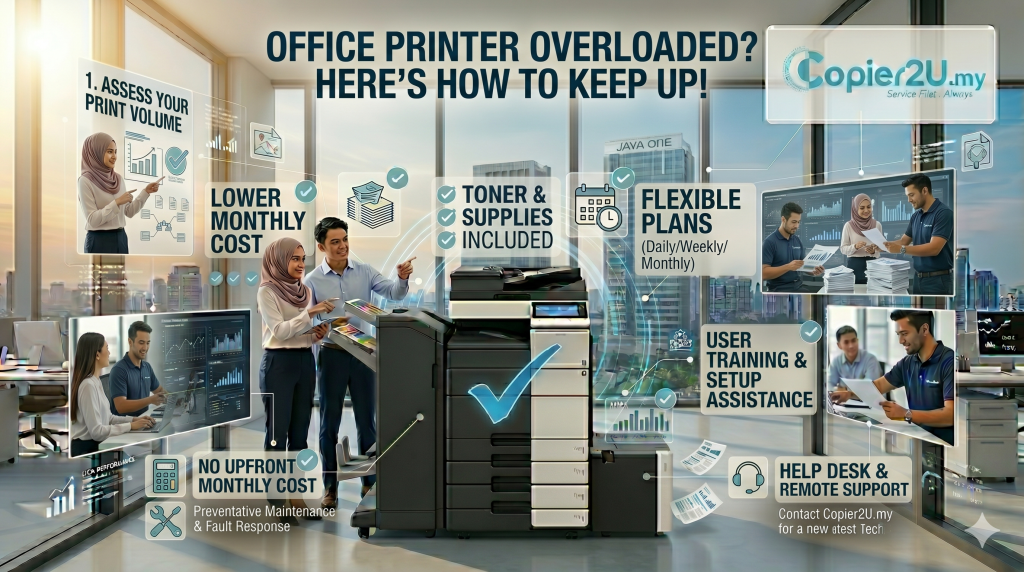
As a local enterprise grows, its internal administrative systems must scale smoothly alongside its expanding operations. During peak business cycles—such as corporate tax filing months, end-of-year accounting audits, or high-volume logistics rushes—the demands placed on your document management hardware increase significantly. If your employees spend valuable time waiting in queues at the print station, dealing with slow document buffering, or clearing frequent paper jams, your printing hardware has likely reached its operational limits. Addressing the question: What to do when your office printer cannot keep up? is essential for maintaining efficient workplace productivity.
Many growing companies make the initial mistake of running underpowered desktop printers far beyond their intended monthly duty cycles, leading to accelerated part wear and frequent breakdowns. To help your operations manager or IT director optimize your document environment, this guide answers the question: What to do when your office printer cannot keep up? We review the warning signs of an overused print system, outline practical print policies, and look at how upgrading to a high-capacity multi-functional copier streamlines your workflows.
Identifying the Signs of an Underpowered Office Printer
Continuing to run a lightweight office printer beyond its operational capacity leads to structural issues. If you are asking, What to do when your office printer cannot keep up? check for these common system warning signs:
Data Processing Buffer Lag: When multiple employees send complex print commands simultaneously, an underpowered device’s limited internal RAM capacity gets overwhelmed. The machine suffers from data lag, taking minutes to process and print simple text or PDF files.
Frequent Component Paper Jams: Every printer is engineered with a specific monthly duty cycle. Forcing a small desktop unit to print high volumes causes internal friction components to overheat, leading to frequent misfeeds and paper jams even when paper is loaded correctly.
Grinding Internal Gear Noises: Lightweight plastic internal drives wear down quickly under heavy multi-user workloads, creating unusual grinding or clicking noises that signal an impending mechanical failure.
Implementing Immediate Workspace Management Policies
Before upgrading your physical hardware fleet, your administration head can deploy immediate workplace rules to manage your print volumes. If you are asking, What to do when your office printer cannot keep up? apply these network adjustments:
Default all Drivers to Duplex and Mono: Configure your shared network server to default all print jobs to double-sided (duplex) and black-and-white (monochrome) mode, which immediately reduces paper usage and color toner consumption.
Enforce Secure PIN Release Printing: Hold print jobs in a secure digital queue until the employee physically walks up to the copier and enters a passcode. This simple step eliminates the common problem of forgotten documents being printed and left abandoned on output trays.
Encourage Digital Cloud Workflows: Urge your team to scan and distribute documents digitally via secure cloud paths rather than printing unnecessary physical duplicates, which helps lower your overall printing costs.
Fleet Capabilities Matrix: Sourcing from the Top 3 Best Photocopier in Malaysia
If your team implements these policies and still finds that your hardware is insufficient, your company needs to scale up to an enterprise-grade multifunction copier lease.
Our expansive inventory features high-capacity configurations selected exclusively from the top 3 best photocopier in Malaysia:
| Fleet Operational Indicator | Ricoh Heavy-Duty Systems | Canon imageRUNNER Advance | Konica Minolta bizhub i-Series |
| Primary Design Benefit | Rugged durability & heavy duty cycles | Unmatched color depth & precision | Smart app UI & cloud workflows |
| Best Local Business Hub | Logistics, Factories & Admin Hubs | Design Agencies & Property Developers | Tech Startups, Finance & Law Firms |
| Print Output Speed Metric | High Speed (Up to 60+ PPM) | High Precision (Up to 55+ PPM) | High Connectivity (Up to 50+ PPM) |
| Toner Supply Conditions | 100% Free & Unlimited Refills | 100% Free & Unlimited Refills | 100% Free & Unlimited Refills |
FAQ
1. What to do when your office printer cannot keep up? What is the most immediate solution?
When asking What to do when your office printer cannot keep up? your first step should be to audit your monthly print volumes. Consolidate small, inefficient desktop printers into a single, centralized enterprise multi-functional printer to manage your workloads effectively.
2. Why does our office printer take so long to print simple PDF files when multiple users are active?
This delay is caused by data buffering lag. Standard office printers have limited internal memory (RAM). When multiple users send complex files simultaneously, the print queue stalls, showing What to do when your office printer cannot keep up?.
3. Can running a printer beyond its monthly duty cycle cause permanent hardware damage?
Yes, absolutely. Forcing a lightweight device to run high volumes causes internal friction components to overheat, which accelerates part wear and leads to frequent mechanical failures.
4. Does setting duplex printing as default help when our office printer cannot keep up?
Yes. Enforcing double-sided printing instantly slashes your paper ream procurement costs by up to 50% and reduces the frequency of paper loading tasks, helping to streamline your office documentation tasks.
5. Are original toner cartridge replacements covered for free under your upgrade contracts?
Yes, completely. Every agreement finalized under our corporate upgrade plans includes our Smart Care Maintenance Plan, ensuring all replacement black and color toner refills are delivered straight to your door at zero extra cost.
6. How quickly can a technician respond if our upgraded copier displays an error code?
We prioritize your operational uptime. If your leased system flags an error code, our response network guarantees that a certified technician will reach your Klang Valley premises within 24 hours to restore your workflow.
7. Can our team print documents wirelessly from smartphones via your upgraded copiers?
Yes, 100%. Every multi-functional system deployed across our rental plans features advanced wireless connectivity, allowing your staff to print seamlessly from MacBooks, Windows laptops, iPhones, and Android devices over the office Wi-Fi.
8. Are there hidden delivery or installation costs when upgrading our office printer configuration?
No, we practice 100% pricing transparency. All upfront logistics expenses—including secure transport, hardware positioning, network IP driver mapping, and full staff training—are covered completely free of charge under our contracts.
Find us
Copier2U's Services
Find the right product based on your requirement.
Refurbished Copiers
Our refurbished copier offer a smart printing solution for businesses seeking reliable performance without compromising on affordability.
Digital Black / White & Colour Copiers
As specialists in refurbishing all kinds of B/W and color copiers from top brands, we offer affordable rental copier plans to meet your business needs.
Spare Part and Consumables Item
Whether you’re in need of replacement parts or consumables to keep your copier running smoothly, we’ve got you covered.
Maintenance Contract
With our maintenance contracts, you can enjoy peace of mind knowing that your copiers are well taken care of.
Copier Rental Service
We offer highly flexible photocopier rental plans tailored to match your specific business timeline and budget. Whether you need a Short-Term Rental, or a Long-Term Rental, we have you covered.
What Our Clients Say
Trusted by businesses across Kuala Lumpur, Selangor & Putrajaya for reliable photocopier rental and fast support.

4.9 Google Rating • Verified reviews from real customers across Malaysia
Our dedicated technical dispatch team provides rapid 24-hours on-site maintenance to ensure your office print workflow runs smoothly. We proudly serve corporate offices, small businesses, and events across all major commercial hubs within Kuala Lumpur, Selangor, and Putrajaya.
Choosing the right office hardware configuration can significantly impact your monthly overhead. Before committing to a machine, it is highly recommended to read our comprehensive guide on Why copier rental is better for growing companies to discover which option best suits your actual monthly print volume. Additionally, keeping your operational budget safe is easy once you understand the simple maintenance habits outlined in our guide on How to avoid unexpected copier repair costs.
Request free quote now
Fill in form or call us +6019 263 0988.
Connect with us today and discover how our expertise can empower your projects.